Android
AvailableGoogle Play. Full system tunnel.
Privacy commitment
VPN PRO 89 encrypts the connection between your phone and the server you choose. No account, no card, and no record of the sites you visit.
Where it runs
No badge claims more than what exists. If something is beta, it says beta; if it does not exist, it says so.
Google Play. Full system tunnel.
.deb and AppImage with published SHA-256. Local proxy mode; the kill switch is not available yet.
Installer and MSI with published SHA-256. Not code-signed: SmartScreen will warn. We say so upfront.
There is no native application: it requires an Apple developer ID and notarisation. It can be used from an AI assistant over MCP.
AI agents
VPN PRO 89 publishes an open MCP server. An assistant can ask it about nodes, network status or how to install, and answer with real data instead of making it up.
To be tested
Look up, not connect. The server is read-only: it does not connect the VPN, change your proxy or touch your network. Connecting is still up to you, from the app.
None is marked verified yet: the MCP is public and any compatible client can use it, but we have not tested each one.
Where they are
The servers the app publishes today, placed by country. The markers show the node's country, not its exact address: the catalogue does not publish that, and we are not going to invent it.
9 countries18 nodes3 protocols
The nodes the app currently publishes, read from the same signed catalogue the application downloads.
…
Latencies are reference values from the catalogue itself, measured from our infrastructure. They are not a measurement from your connection, which will depend on your network and location.
From Google Play. No account, no email, no card.
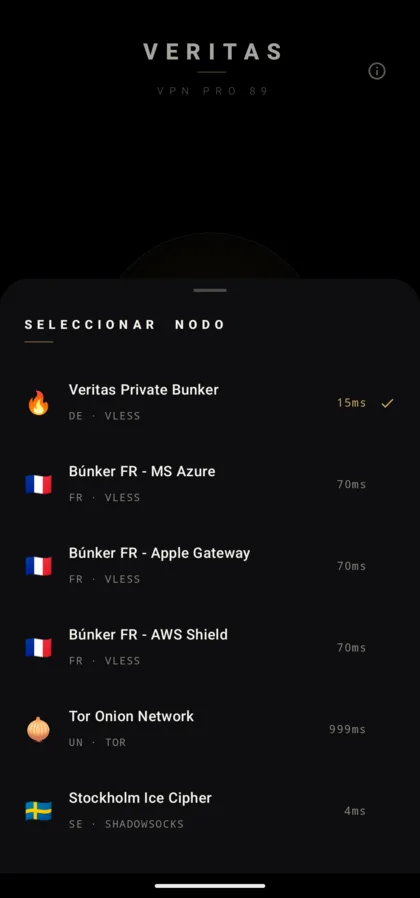
With its country, protocol and reference latency in view.
Android asks for confirmation to create the tunnel. The system handles it.
Status always visible. One tap disconnects.
Exactly what changes when the tunnel is on. Without exaggerating either column.
What does not change: if you sign in to an account, that service still knows who you are. A VPN does not give anonymity.
How it is used
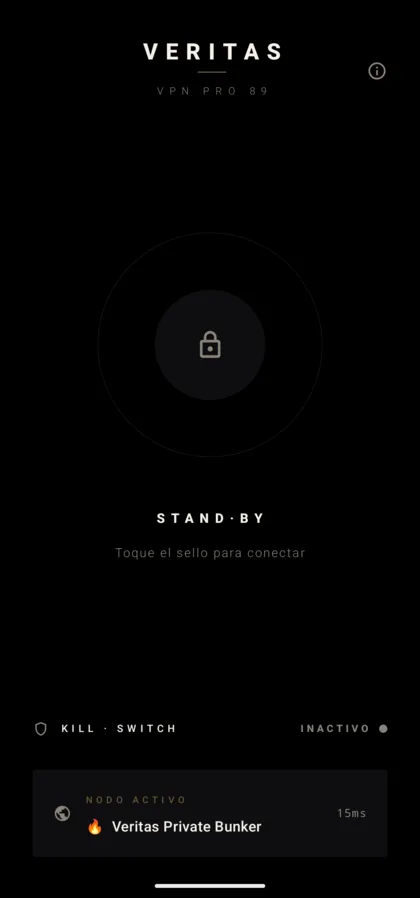
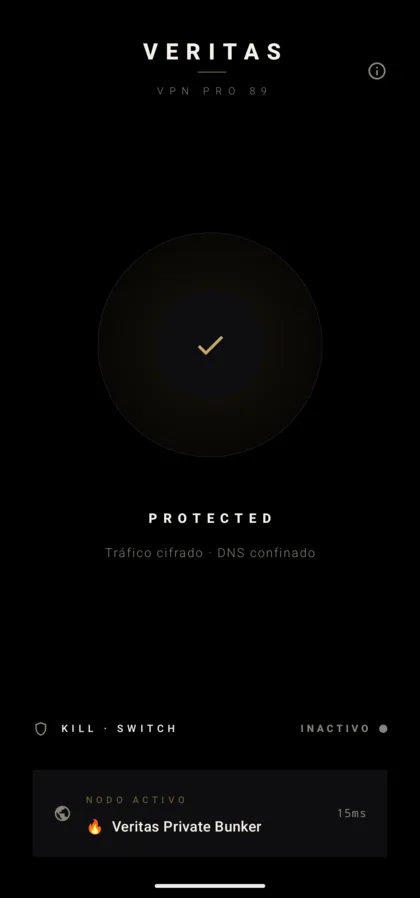
The whole application fits in three views. There are no hidden settings, no setup wizard and no account to create.
A single control. When you tap it, Android asks for confirmation to create the tunnel: that permission is handled by the system, not by us.
Each server shows its country, protocol and reference latency before you connect. You can switch at any time.
The app always says whether you are disconnected, connecting or connected, and with which server. One tap disconnects.
Features that exist in the app today. Not one more.
Traffic between your device and the server travels inside an encrypted connection, built on the open-source Xray-core engine.
VLESS with XTLS-Reality on every platform, and Shadowsocks on Android: transports designed for restrictive networks. Tor routing is also available.
While connected, DNS queries resolve through the tunnel rather than through the local network.
The app shows whether you are disconnected, connecting or connected, and which server is in use.
If the tunnel drops, it can block traffic so your connection does not silently fall back to the open network.
The node list is cryptographically signed and the app verifies the signature before using it.
We would rather say it plainly than promise what we cannot deliver.
A VPN encrypts the path to the server. Sites you sign in to still know who you are.
It does not protect your device from malware and does not encrypt your files.
A service can block VPN addresses whenever it wants. Nobody can promise you otherwise.
If your threat is a state with traffic-analysis capability, the right tool is Tor.
There is no paid tier, no reserved features and no artificial limit pushing you to buy. Running the servers costs money, and voluntary donations cover it. Someone who cannot donate gets exactly what a donor gets.
The app was born after losing my father, so that families separated by borders and restrictions could keep talking.
Donating is optional and changes nothing about what you get. Someone who does not donate uses exactly the same service.
Yes. There is no paid version, no locked features and no trial that expires. It is funded by voluntary donations and shows no ads.
No. The app asks for no email, no phone number and no sign-up. Install it, pick a server, connect.
We keep no record of the sites you visit. Our web server does keep ordinary access logs for 7 days, like any website. We explain it in detail in what we log.
It is designed for that: it uses transports such as VLESS with XTLS-Reality, which behave differently from an ordinary VPN protocol on restrictive networks. We cannot guarantee it will always work on every network.
In most countries yes, but some restrict or ban them. Check the law where you are: that is your responsibility.
None that identifies you. It carries no analytics or advertising SDK. Crash reports are off by default and are only sent if you turn them on.
To encrypt your connection on a network you do not control: airport, hotel or café wifi. We cover it in what is a VPN.
Today the available download is the Android one, 8.0 or newer. We will not announce a Windows, macOS, Linux or iOS version until it can be downloaded.
Download the app, pick a server and connect. No sign-up and no payment details.
View on Google Play The app is awaiting approval on Google Play